Introduction
Payonic provides a 3-D Secure (3DS) solution designed to help integrators authenticate cardholders and reduce fraud in online transactions. Our service focuses on 3-D Secure 2, the industry standard for secure online authentication, ensuring compliance with the latest requirements from major card networks.
The Payonic 3DS API is language-agnostic and accessible over HTTP, making integration straightforward across different platforms. The service supports all active 3DS2 protocol versions (2.1.0, 2.2.0, and 2.3.1).
At its core, 3-D Secure verifies cardholder participation during checkout, confirming that the person making a purchase is the legitimate card owner. The authentication flow produces a cryptographic proof of authentication that can be seamlessly passed into the payment process.
Recommendations
For customer-initiated transactions, we generally recommend integrators to use the Gateway solution, as it is the simplest and fastest to implement. With the Gateway solution, the integrator does not need to manage the client-side part of the 3DS protocol - this is handled entirely by Payonic.
Within the Gateway solution, we recommend using the Full Flow over the more advanced Split Flow. The increased complexity of the Split Flow usually does not outweigh the slight improvement in user experience.
When using the Gateway solution, tracing can be enabled to track all executed steps, including client behavior. This simplifies debugging in production and allows merchants and integrators to quickly identify issues. Note that tracing is not available in the SDK solution.
The SDK solution is recommended only for advanced integrators who require full control over the user interface and advanced flow control during customer-initiated transactions.
The SDK solution is required for integrators handling 3RI authentications during recurring transactions. 3RI only requires the first two calls to /preAuth and /auth and involves no client interaction, allowing it to be handled entirely server-to-server with two requests.
Note: The Gateway solution supports the full set of 3DS protocol features, and both SDK and Gateway solutions use the same request structure. This makes it easy to switch between solutions without significant code changes.
The recommended approach for most integrators is to use the Gateway solution for customer-initiated transactions and the SDK for 3RI authentications, combining simplicity with full protocol support.
Flows
Payonic supports multiple ways for handling the 3DS / 3RI flow. You can read more about the different flows below.
Gateway Full
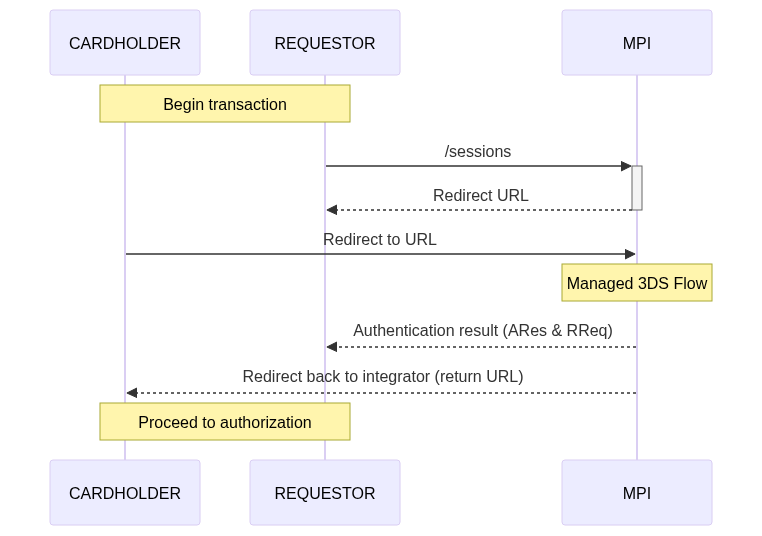
The Gateway flow is the simplest way to integrate with Payonic 3DS. The integrator creates a session with a single API request and receives an authentication URL. The cardholder is redirected to Payonic, which manages the entire 3DS flow, including any challenge. Once completed, the cardholder is redirected back to the integrator, and a webhook is sent with the final result.
The Full Flow is the standard Gateway flow and is the simplest to implement. Key points:
- A single URL is provided by the integrator (fullUrl).
- The full 3DS flow begins immediately once the URL is rendered.
- The cardholder completes the flow as usual, and the final result is sent via webhook.
- This flow does not require a redirect and can also be rendered in an iframe modal or a popup window on the merchant site.
Gateway Split
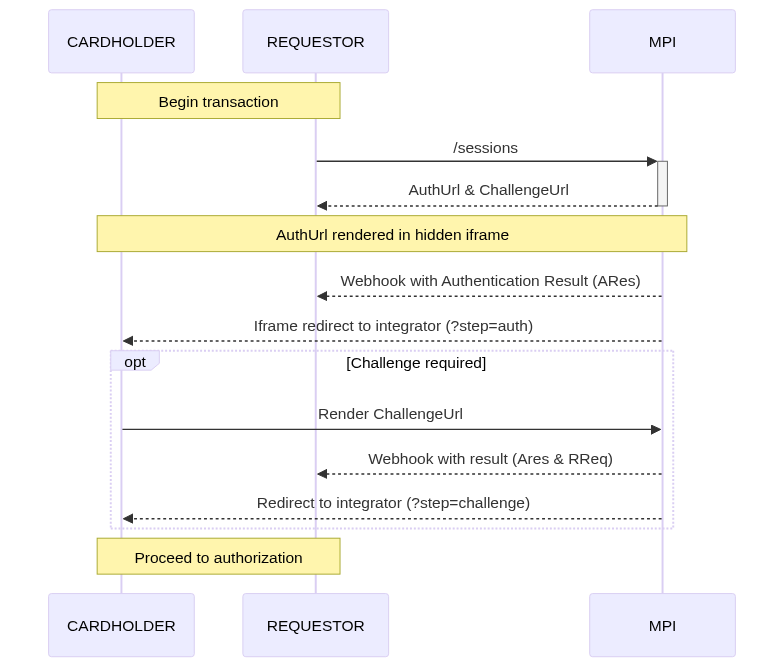
The Split Flow is a more advanced gateway option, offering a better user experience in certain cases:
- Two URLs are provided: an AuthUrl and a ChallengeUrl.
- The AuthUrl is rendered in a hidden iframe on the merchant site. In this iframe:
- The first steps of
preAuthandAuthare executed. - These steps require no user interaction.
- Once completed, a webhook is sent to the integrator with the Authentication Result (ARes).
- If the result indicates a challenge is required, the integrator renders the ChallengeUrl for the cardholder to complete the challenge.
- After completion, a new webhook is sent with the final results.
Pros and Cons:
- Advantage: Only displays UI elements to the cardholder if a challenge is actually required, improving the user experience.
- Disadvantage: More complex to implement compared to the full Flow.
- Main difference: In the full flow, the cardholder always sees a visual loading spinner during the AuthStep. In the split flow, this spinner can be hidden, as the initial steps run in a hidden iframe.
Note: If minimizing the cardholder's exposure to the loading spinner is not important for your integration, we recommend using the Full Flow for its simplicity and ease of implementation.
SDK
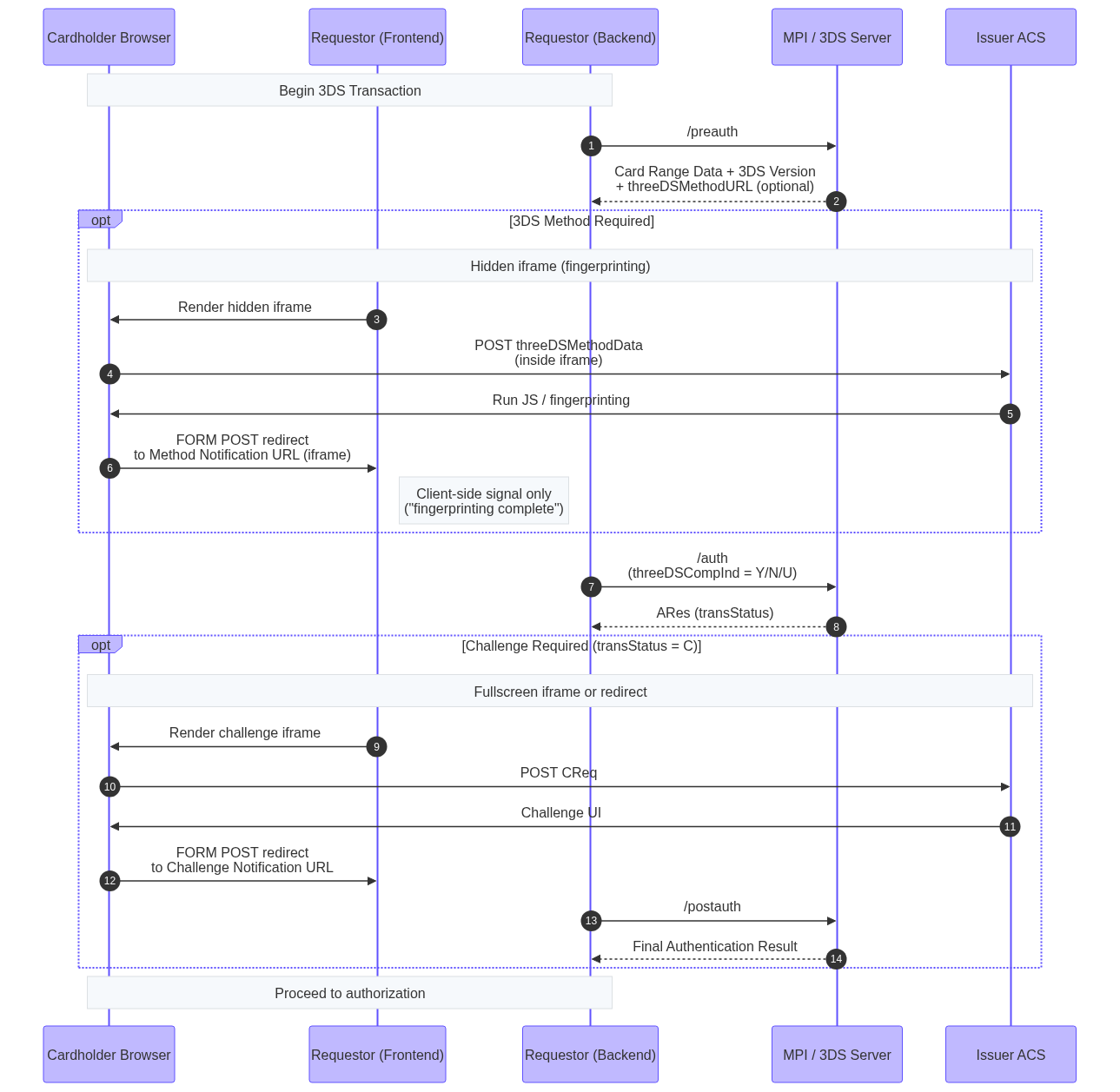
The SDK flow exposes the raw 3DS protocol, giving integrators full control of the authentication process. This is best suited for advanced use cases where the integrator needs direct access to request/response handling, protocol data, and error management.
SDK Examples
The 3DSv2 specification is flexible, but this flexibility can also make the interface a bit tricky. While the specification defines certain fields as mandatory, each card network may also require its own additional fields.
In the examples below, we’ll provide JSON samples that include the minimum set of fields required by all card schemes. These samples will use placeholder values for demonstration purposes.
For detailed information about specific fields, please refer to the reference documentation.
Gateway compatability
The same examples apply to our Gateway solution. Instead of sending data to the /auth endpoint, include it in the authentication field of the Create Session Gateway request.
Browser Example
- Call the
/preauthendpoint to:
- Check if the card is enrolled in 3-D Secure v2.
- Identify the version of the protocol in use (v2.1.0, v2.2.0, or v2.3.1).
- Retrieve the
threeDSMethodURLto know if the 3DS Method step is required.
-
If a
threeDSMethodURLis returned, perform the 3DS Method step before continuing. -
Send an authentication request using the
/authendpoint:
- Include the
threeDSServerTransIDfrom the/preauthresponse. - Set
threeDSCompIndto Y when the 3DS Method was successful, or N if it was not.
-
If the authentication response has
transStatus = C, start a challenge flow on the cardholder’s device. -
After the challenge is complete, call the
/postauthendpoint to:
- Retrieve the final authentication values.
- This applies to protocol versions v2.1.0, v2.2.0, and v2.3.1.
{
  "acctNumber": "9000100511111111",
  "threeDSServerTransID": "8f666297-4a20-4aff-b03d-8fc386fef18f",
  "notificationURL": "https://3ds_callback.example.org/challenge/end",
  "threeDSCompInd": "Y",
  "threeDSRequestorURL": "https://threedsrequestor.example.org",
  "acquirerBIN": "438309",
  "acquirerMerchantID": "00002000000",
  "cardExpiryDate": "1910",
  "billAddrCity": "Bill City Name",
  "billAddrCountry": "840",
  "billAddrLine1": "Bill Address Line 1",
  "billAddrPostCode": "Bill Post Code",
  "billAddrState": "CO",
  "email": "example@example.com",
  "threeDSRequestorAuthenticationInd": "01",
  "cardholderName": "Cardholder Name",
  "deviceChannel": "02",
  "browserJavascriptEnabled": true,
  "browserAcceptHeader": "text/html,application/xhtml+xml,application/xml; q=0.9,*/*;q=0.8",
  "browserIP": "192.168.1.11",
  "browserJavaEnabled": true,
  "browserLanguage": "en",
  "browserColorDepth": "48",
  "browserScreenHeight": "400",
  "browserScreenWidth": "600",
  "browserTZ": "0",
  "browserUserAgent": "Mozilla/5.0 (Windows NT 6.1; Win64; x64; rv:47.0) Gecko/20100101 Firefox/47.0",
  "mcc": "5411",
  "merchantCountryCode": "840",
  "merchantName": "Dummy Merchant",
  "messageCategory": "01",
  "messageType": "AReq",
  "messageVersion": "2.2.0",
  "purchaseAmount": "101",
  "purchaseCurrency": "840",
  "purchaseExponent": "2",
  "purchaseDate": "20240621111213",
  "transType": "01"
}
3RI Example
- Call the
/preauthendpoint to:
- Check if the card is enrolled in 3-D Secure v2.
- Identify which protocol version is being used (v2.1.0, v2.2.0, or v2.3.1).
- Submit an authentication request with the
/authendpoint.
- Include the
threeDSServerTransIDfrom the/preauthresponse.
{
  "acctNumber": "9000110511111111",
  "threeDSServerTransID": "8f666297-4a20-4aff-b03d-8fc386fef18f",
  "threeDSRequestorURL": "https://threedsrequestor.example.org",
  "acquirerBIN": "438309",
  "acquirerMerchantID": "00002000000",
  "cardExpiryDate": "1910",
  "billAddrCity": "Bill City Name",
  "billAddrCountry": "840",
  "billAddrLine1": "Bill Address Line 1",
  "billAddrPostCode": "Bill Post Code",
  "billAddrState": "CO",
  "email": "example@example.com",
  "cardholderName": "Cardholder Name",
  "deviceChannel": "03",
  "threeRIInd": "01",
  "mcc": "5411",
  "merchantCountryCode": "840",
  "merchantName": "Dummy Merchant",
  "messageCategory": "02",
  "messageType": "AReq",
  "messageVersion": "2.2.0"
}
Visa Data Only Example
- Call the
/preauthendpoint to:
- Check if the card is enrolled in 3-D Secure v2.
- Identify the version of the protocol in use (v2.1.0, v2.2.0, or v2.3.1).
- Retrieve the
threeDSMethodURLto know if the 3DS Method step is required.
-
If a
threeDSMethodURLis returned, perform the 3DS Method step before continuing. -
Send an authentication request using the
/authendpoint:
- Include the
threeDSServerTransIDfrom the/preauthresponse. - Set
threeDSCompIndto Y when the 3DS Method was successful, or N if it was not. - Set
threeDSRequestorChallengeIndto 06 to initiate Visa Data Only
Visa Data Only is triggered in the same way as a standard browser authentication request,
except the challenge indicator is set to 06 (Data Only).
For Visa cards, this guarantees a frictionless flow with transaction status I and no follow-up challenge.
Visa Data Only does not shift liability to the issuer but may reduce authorization decline rates by providing additional information.
The merchant submits an authentication request with the Data Only indicator
(threeDSRequestorChallengeInd = 06).
The response (ARes) will include:
- Transaction status: I
- ECI: 07
- CAVV (authenticationValue)
{
  "acctNumber": "9000100511111111",
  "threeDSServerTransID": "8f666297-4a20-4aff-b03d-8fc386fef18f",
  "notificationURL": "https://3ds_callback.example.org/challenge/end",
  "threeDSCompInd": "Y",
  "threeDSRequestorURL": "https://threedsrequestor.example.org",
  "acquirerBIN": "438309",
  "acquirerMerchantID": "00002000000",
  "cardExpiryDate": "1910",
  "billAddrCity": "Bill City Name",
  "billAddrCountry": "840",
  "billAddrLine1": "Bill Address Line 1",
  "billAddrPostCode": "Bill Post Code",
  "billAddrState": "CO",
  "email": "example@example.com",
  "threeDSRequestorAuthenticationInd": "01",
  "threeDSRequestorChallengeInd": "06",
  "cardholderName": "Cardholder Name",
  "deviceChannel": "02",
  "browserJavascriptEnabled": true,
  "browserAcceptHeader": "text/html,application/xhtml+xml,application/xml; q=0.9,*/*;q=0.8",
  "browserIP": "192.168.1.11",
  "browserJavaEnabled": true,
  "browserLanguage": "en",
  "browserColorDepth": "48",
  "browserScreenHeight": "400",
  "browserScreenWidth": "600",
  "browserTZ": "0",
  "browserUserAgent": "Mozilla/5.0 (Windows NT 6.1; Win64; x64; rv:47.0) Gecko/20100101 Firefox/47.0",
  "mcc": "5411",
  "merchantCountryCode": "840",
  "merchantName": "Dummy Merchant",
  "messageCategory": "01",
  "messageType": "AReq",
  "messageVersion": "2.2.0",
  "purchaseAmount": "101",
  "purchaseCurrency": "840",
  "purchaseExponent": "2",
  "purchaseDate": "20240621111213",
  "transType": "01"
}